Article
AI vs. Traditional Automation: A Business Leader’s Guide
Learn when simple rule-based workflows are enough, when AI is required, and how combining both delivers maximum ROI at minimum risk.
The Core Difference: "Follow Rules" vs. "Interpret Information"
Article 1 answers “What should we automate?” This article answers the next question: once we have identified a process worth improving, how should we automate it? The choice depends on how predictable the work is and whether the information requires interpretation.
| Feature | Traditional Automation | AI-Powered Automation |
|---|---|---|
| How It Works | Follows strict If / Then rules. | Reads, interprets, and decides based on context. |
| Best Data Type | Structured (Spreadsheets, databases, web forms). | Unstructured (PDFs, emails, customer voicemails, contracts). |
| Behaviour | Applies defined rules consistently when inputs and conditions are as expected. | Interprets information and produces an output based on context. |
| Cost to Run | Generally low marginal cost once implemented. | Higher per-transaction cost (model processing fees). |
| Speed | Instantaneous (milliseconds). | Typically slower than deterministic automation because processing requires model inference. |
1. Traditional Automation: Fast, Reliable, and Inexpensive
Think of traditional automation as a digital assembly line. It handles predictable, repetitive tasks consistently when the rules, inputs, and conditions are defined.
- Data Transfers: Copying a deal from your website form into your CRM.
- Scheduled Actions: Sending monthly invoice reminders or auto-generating payroll updates.
- Calculations: Applying standard discounts, tax math, or shipping fee lookups.
The Business Case
- Low marginal cost: Once implemented, rule-based workflows can be inexpensive to run at scale.
- Easier to test: Defined rules and expected inputs make the workflow straightforward to validate, although incorrect rules or inputs can still produce incorrect outcomes.
2. AI: Handling Messy Inputs and Unstructured Information
AI is useful when incoming information needs to be interpreted before the next business action can be determined.
- Customer Support Inquiries: Reading an open-ended customer email and determining if it’s a billing issue, a complaint, or a sales lead.
- Document Processing: Extracting key dates, amounts, and line items from incoming vendor invoices with varied layouts.
- Knowledge Search: Let employees ask questions across hundreds of internal PDFs and policy documents to get instant answers.
What to Watch Out For
- Higher Unit Costs: Every AI request costs model execution fees.
- Quality Monitoring Required: AI requires periodic oversight to ensure outputs remain accurate as customer behaviors shift.
3. The Winning Blueprint: AI + Traditional Automation
A strong pattern is to use AI where interpretation is required and traditional automation where execution is predictable.
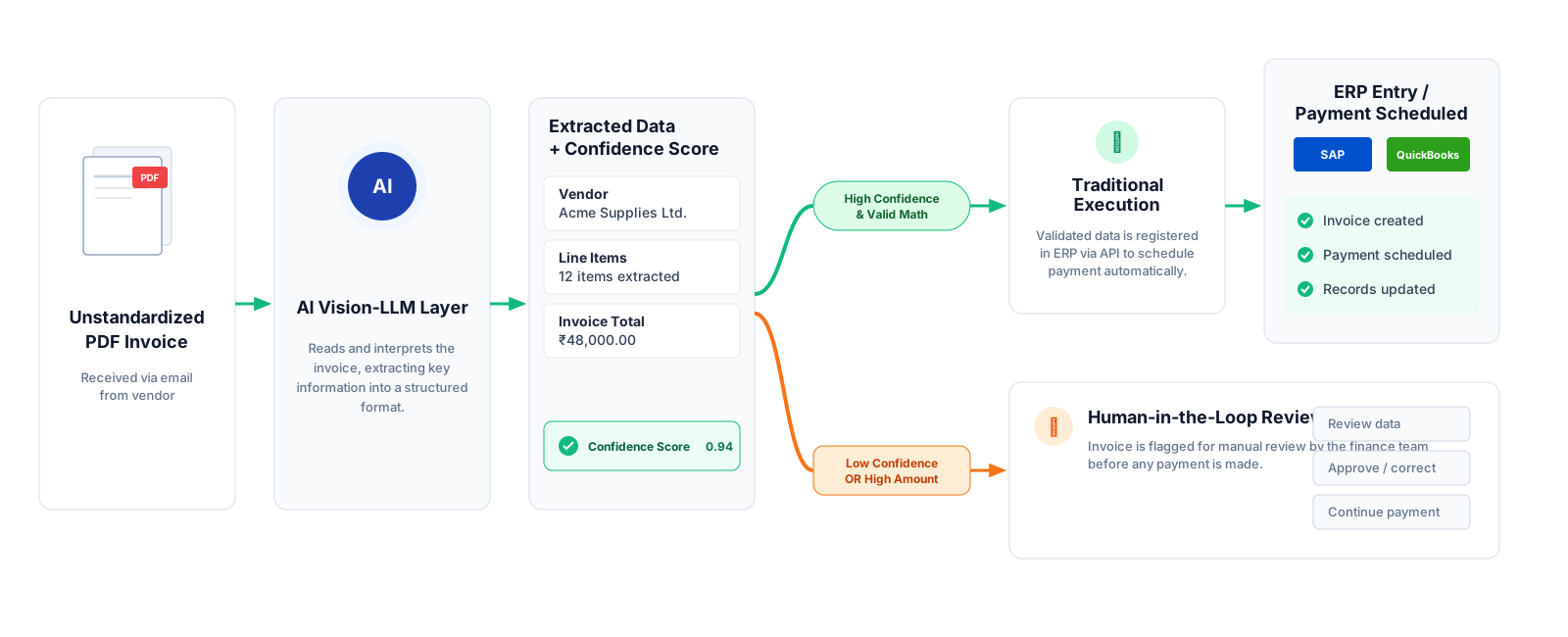
Architectural Example: Automated Accounts Payable
1. Input: A vendor sends an invoice in an inconsistent format.
2. AI Interpretation Layer: AI extracts and interprets the relevant vendor, line-item, and total information.
3. Validation Layer: Deterministic checks validate the extracted values and apply the relevant business rules.
4. Traditional Execution Layer: Once validated, automation records the invoice and continues the predictable workflow, such as applying payment terms.
5. Human Review: Low-confidence or higher-risk cases are routed to a person before the workflow continues.
Decision Checklist: Which Should You Use?
Use this quick guide when planning your next operations project:
- Go with Traditional Automation if...
- The inputs are structured (forms, numbers, database fields).
- The process can be handled using clear, reliable rules and defined inputs.
- You need fast, predictable execution.
- Go with AI + Automation if...
- Information comes in messy formats (free text, varied PDFs, phone transcripts).
- Your team spends hours manually sorting, tagging, or routing requests.
- You can put a human-in-the-loop safety net on high-stakes actions.
Summary Checklist for Executives
Before approving any new automation budget, ask your team three questions:
- Could a basic spreadsheet rule or form field solve this? If yes, traditional automation may be enough.
- What happens if the AI makes a mistake? (Ensure low-confidence cases auto-route to a human staff member).
- Does the time saved justify the ongoing processing costs? (Ensure AI fees don’t outweigh manual labor savings).